
1,500+ tools. Your systems, connected.
Connect the apps your work already runs on, plus . Choose each agent can use.
The Boring product
Build and operate agents as a team. Define the process, grant exact actions, assign the decisions, and keep the work reviewable from the first trigger to the final result.
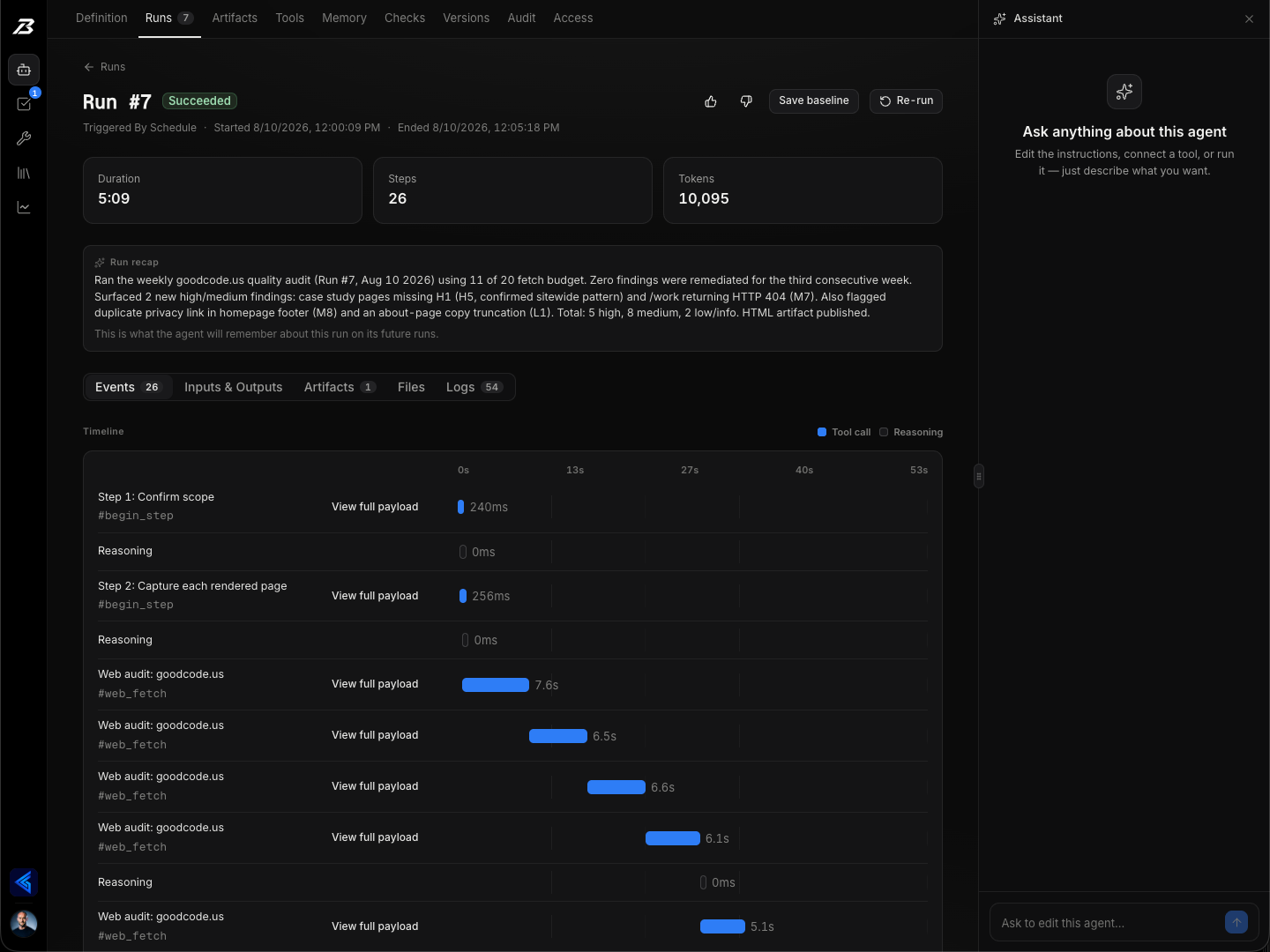
Choose what starts the work, connect the tools, and write the instructions. Your team can read and change the same agent.
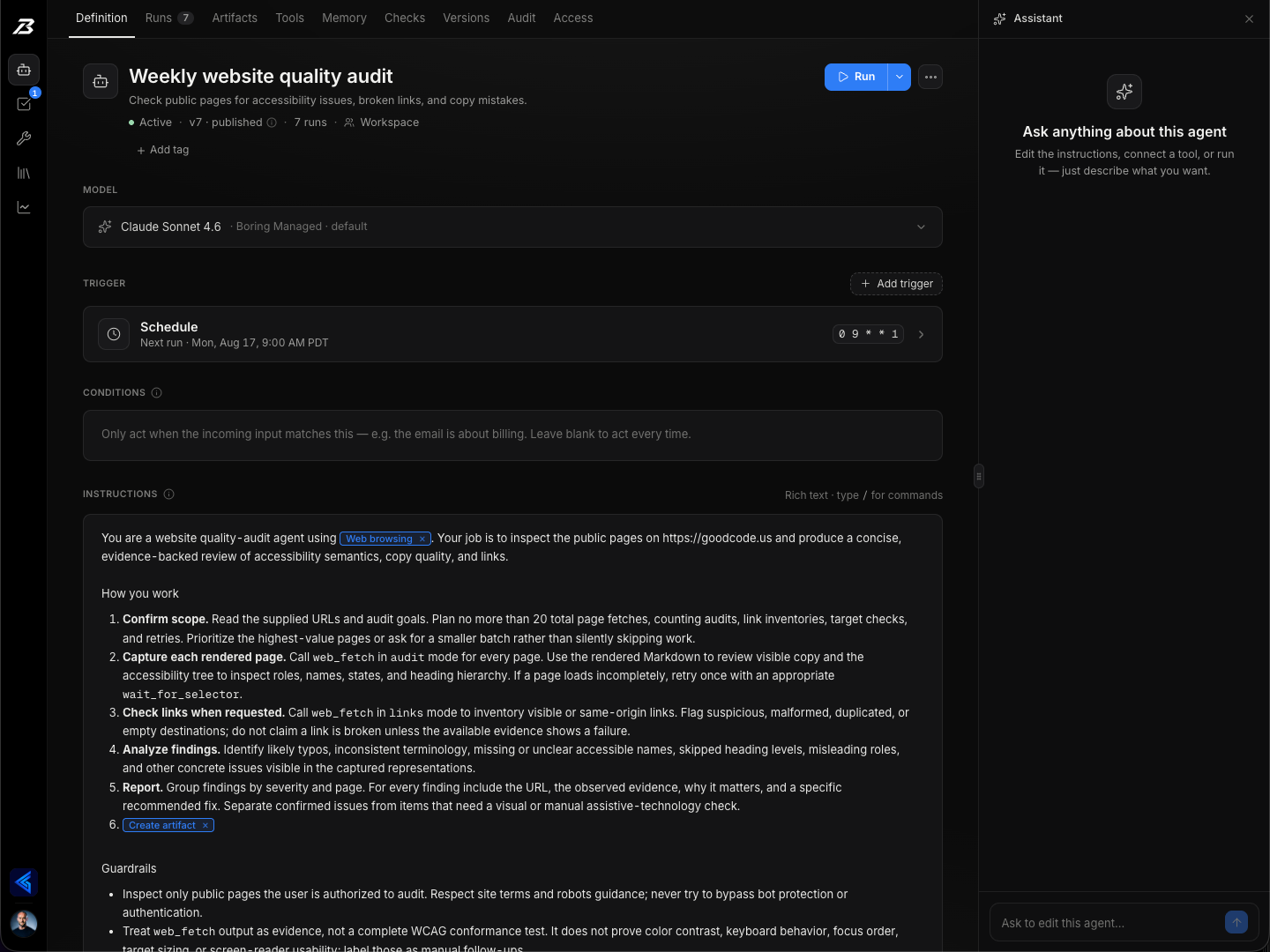
Apply Allow, Ask, or Never rules to an exact action and its arguments. Publish the draft when it’s ready; active runs keep their original rules.
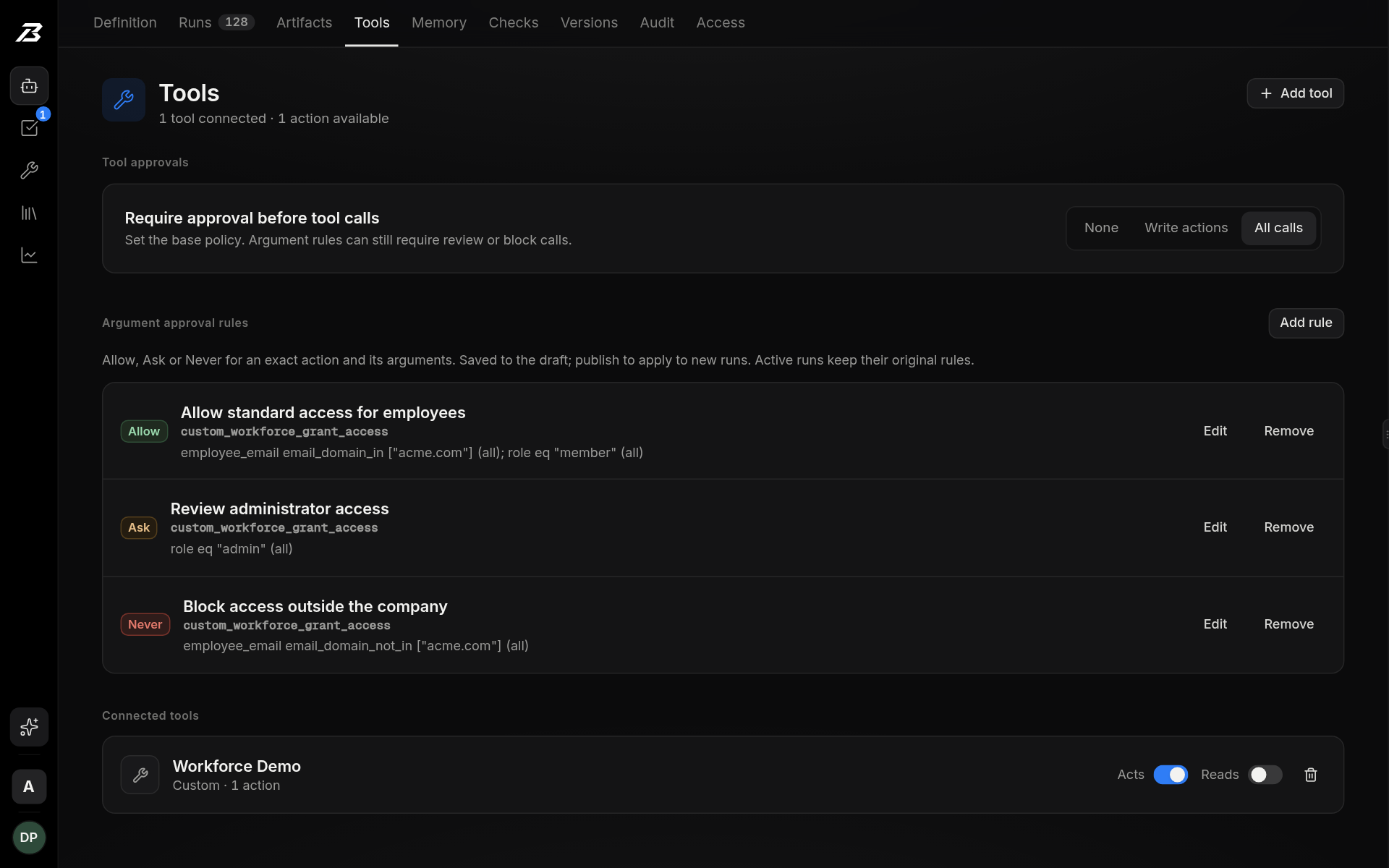
New agents ask before connected actions. Review the exact request, change the details, or say no. Approved work carries on in the same run.
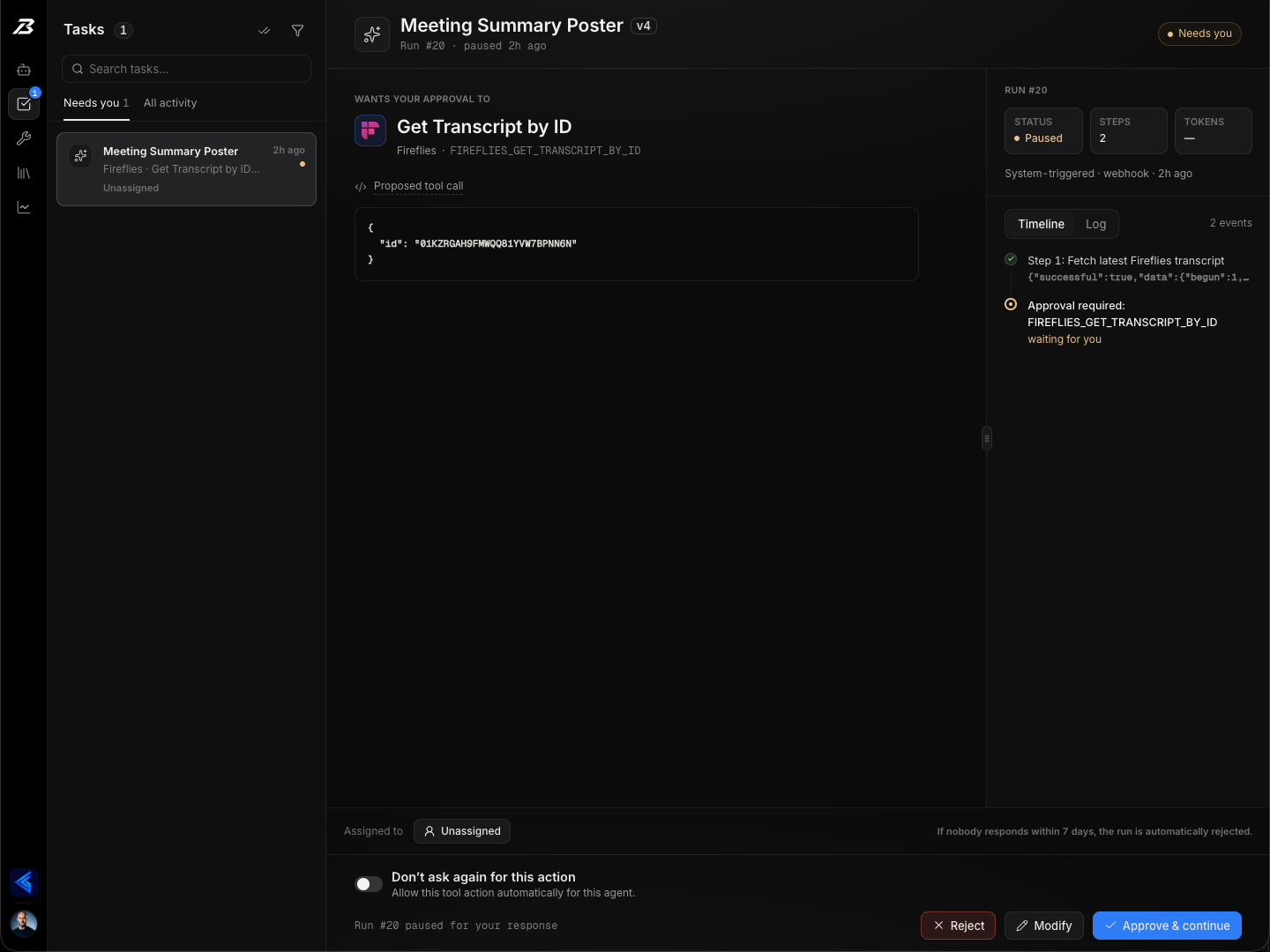
Open a run to follow the tool calls, approvals, and outputs. When something fails, the record helps your team see where and why.
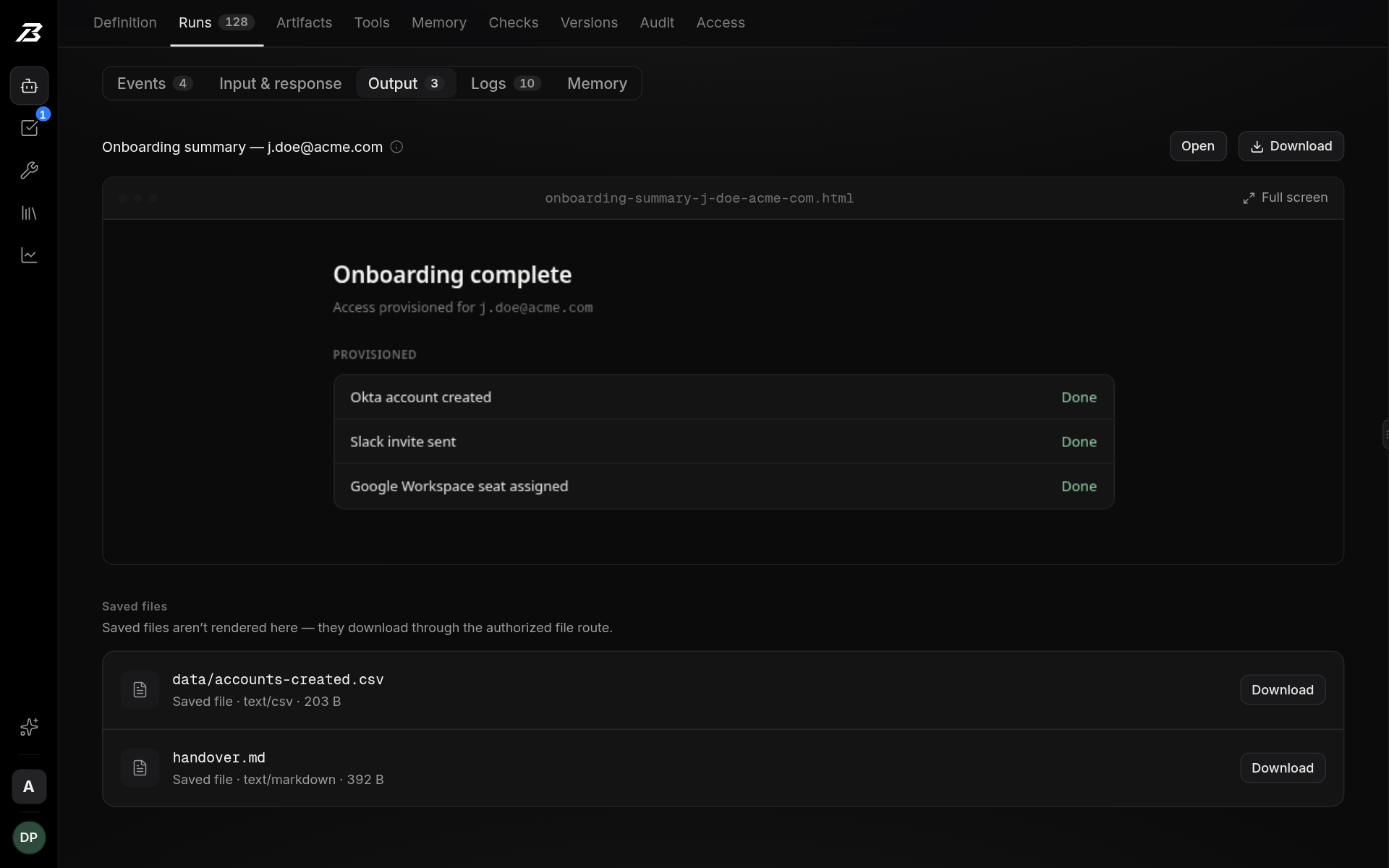
Get a readable result and download the files the run created. Your team can trace the outcome back to the work and decisions behind it.
The brief, triggers, and instructions live together in the agent’s definition.
Real product · Sample dataExplore the six parts of the platform. Open any capability for the details, limits, and controls behind it.
Describe the work, connect the right tools, and give your team an agent they can shape together.
Connect the apps your work already runs on, plus . Choose each agent can use.
Start an enabled agent in a Slack DM or @mention. Get results in the thread and with the same agent when it finishes. Shared agents can add . Your linked Boring account determines what you can run.
Use Boring-managed with no setup: , or GPT, Gemini, and Grok with no key. Lower-cost open-weight models are rolling out. Or Anthropic, OpenAI, Google, OpenRouter, or .
Turn plain-language instructions into . Review the draft and when it is ready.
Delegate a task to another agent in the same workspace, wait for its result, and continue with that output. , depth limits, and keep delegation bounded.
, , , , , , , , , and can all start the same agent.
Build Boring into your own systems. Manage agents, start runs, and retrieve results through a , with an generated from the same route schemas.
Import an or connect a token-authenticated , review the discovered actions, and attach the toolkit to the agents that need it.
Edit instructions together with . A visible keeps drafts editable if the live room is unavailable.
Browse and adapt a starter agent to your team. Each starts as a for you to connect, review, test, and publish.
Build an intake form with text, email, dates, and choice fields. Share its and turn submissions into agent runs with the submitted context.
explores your recurring work, suggests directions, and turns your chosen idea into a .
Control what an agent can reach, which actions it can take, and where its credentials live.
A handles authenticated requests. The engine receives tied to the run, workspace, and agent version.
Grant only the an agent needs. The runtime enforces the list: a withheld action is and cannot run. Connecting an app does not grant unrestricted access to it.
Connect several named accounts for the same app or custom integration, keep each private or shared, and . If a pinned account is removed or expires, instead of switching accounts.
When an agent holds a broad app grant, the assistant suggests narrowing it to the exact actions its instructions and use. Each action is checked against the live catalog, and .
Tool access checks current connections and . blocks subsequent authorized requests.
Run calculations in a fresh, bounded sandbox. No network, credentials, packages, or host access; only are available. Python is .
are redacted from returned content and errors, including secret echoes .
TLS protects data in transit. Credentials Boring stores directly use an .
We never train foundation models on your content, and we never sell your data.
Send each sensitive step to the right person with the exact proposed action, a due date, and reminders. They approve it, change it, or stop it, and the runtime enforces the gate, not the prompt.
A gated action waits for its reviewer with the exact tool call and scrubbed arguments up front. Approve it or , and the run picks up where it paused; . Approve or reject from the mobile companion too.
New agents start with waiting for approval, so loosening that is a deliberate choice. When Boring can’t tell whether an action only reads, it .
Press ⌘J or Ctrl+J anywhere in the web console. Ask , what is waiting on a person, or where the spend went. It reads run evidence before diagnosing, sees only agents you can access, and .
, set , and choose what happens when an approval is still waiting after its due date: reject it and stop the run, or skip the action and continue.
Set for the amount, recipient, domain, or other fields of a proposed action. Apply them to connected apps and alike. Review an exception, block a matching action, or allow an eligible call within the boundaries you set.
Tell a Slack agent “ask me before sending” or add a . Boring confirms the exact holds before work starts and enforces them . Unsupported or ambiguous holds stop the request with an explanation.
Control . Set each agent to pause before all calls, write actions only, or none. Manage individual Allow, Ask, and Never rules in the Tools tab, then .
Review the exact proposed action and scrubbed arguments, then approve or reject with your . Answer supported input requests with , or adjust a supported call with , directly in Slack. Complex forms link to the console for review.
Open “Change this” on a run or task. Use its evidence to propose , , and apply it to the draft. Publishing remains a separate decision; the activity record links back to the source run.
The supports approvals, human-input requests, live runs, stop and retry, and workspace usage.
When a required detail is missing or a target is ambiguous, the agent can without a prewritten pause point. Answer in Tasks or a , then continue with the human response in context.
See the agent’s permitted tools, limits, waits, retries, stops, and notification routes. The distinguishes enforced limits from model-judged behavior.
Runs outlive the machines they start on. Saved progress, separate failure budgets, durable waits, and a limit on every axis keep a crash, an outage, or a confused agent from turning into repeated work or runaway execution.
Structured runs save their plan, progress, and action outcomes. from the last completed step; when , Boring blocks automatic repetition instead of guessing.
Numbered instructions run as an enforced plan: one step at a time, with until the agent reaches them. Each step must be marked complete, with , before the next begins.
Each model turn runs as its own durable workflow step and saves a when it finishes. If the machine running an agent disappears mid-run, another picks the run up from the last completed turn instead of starting over.
When a model provider throttles or fails, eligible runs wait within a , honor its cooldown, and don’t repeat completed work. In structured runs, outage recovery never spends the attempts a step gets for real mistakes. If the provider stays down, the run ends with its saved progress and a clear reason.
Approvals and pause the run, survive restarts, and hold no capacity while they wait. An approval waits seven days by default, or a day past its due date, and is never treated as approved. When the answer arrives, the run continues where it stopped.
Each scheduled occurrence is claimed under a unique key, that carry a delivery ID are deduplicated, and is written only once. A retry upstream doesn’t start a second run, and a second click doesn’t decide twice.
Reasoning, tool calls and results, approvals, agent calls, outputs, and errors are stored with a sequence number the database assigns in the same write as the event. Reconnect from and the rest replays in order.
Your plan’s constrain model spend. count toward the run ceiling before another request is admitted.
Set a per-run maximum, daily and billing-period workspace budgets, and . Each model request, including the assistant, drafting, checks, and calls on your own keys, before it is sent. Budgets cover Boring’s recorded model usage, not provider invoices.
, , , , , , , and each have an enforced limit, so a confused agent can’t loop, flood a system, or spend without end.
A schedule pauses after until you re-enable it, giving your team time to fix the underlying problem.
Full input schemas guide tool calls. and address invalid arguments while preserving unrelated valid fields. Reviewed, version-matched tool guidance helps avoid known mistakes; inputs are checked before execution.
flag setup and instruction issues. After publication, can suggest fixes for ambiguity; your team reviews and applies the changes.
Try unpublished changes with a while scheduled work keeps using the published version. Draft runs use real tools; Confidence checks provide recorded replay.
Confidence checks against a draft with live tools blocked. Inspect changed tool calls, arguments, and approvals.
See what ran, what didn’t, what it cost, and which evidence supports completion. Keep the decisions attached to the run.
Add to structured steps. Require a or a for an exact target before the step can complete.
Follow as they happen. Inspect retained request and from the run timeline.
Keep proposed actions, confirmed results, and distinct. is not treated as proof of delivery.
are labeled as billing, rate limiting, or context size, with the provider’s ready to copy. is flagged as a safety stop, with guidance, instead of reading like an error.
explains why scheduled or email-triggered work didn’t start: a skipped schedule, a filtered email, a blocked run, or a schedule paused after repeated failures. Entries are kept for 30 days. It is an operations log, not a complete audit log.
Owners and admins see , and compare per-run costs.
Download summaries of an agent’s for reporting and review, with a note when older runs are left out. Retained tool-call payloads remain inspectable in the console.
Review the agent’s for recorded changes to permissions, tools, triggers, knowledge, and published definitions, with the actor and before-and-after context.
Every version stays a diff you can review and . and move between workspaces without secrets.
Recent run outcomes surface . bring failures, blocked runs, and approval requests to your team.
workspace owners and admins receive an email and in-app of runs, outputs, approvals, and spend, with week-over-week context.
Ground the work in your sources, keep learning reviewable, and deliver files and reports your team can use.
Create . Keep artifacts private to authorized, signed-in workspace members, or to share publicly with end users. stay workspace-only.
Index individual web pages, RSS, text, and into . Re-sync supported web sources .
Load and inspect with , without configuring an external browsing tool.
can turn experience and your feedback into for future runs. Every lesson links to its source. Set inferred learning to .
Read and edit files from repositories , then for review. Publishing changes is approval-gated; .
Collect the CSVs, JSON extracts, charts, and in one place on its run.
, recent-run recaps, and lessons . Inspect, manage, or download the agent’s ; learning updates its context, not the underlying model.
However work arrives, Boring applies the same scope, human checkpoints, execution controls, and reviewable record.
Other starts · 6
context assembly
policy layer
bounded runtime
evidence + operator record
Access is scoped before an action. Recovery keeps recorded progress, and a numbered plan never repeats an uncertain write automatically. Authored completion requirements check saved evidence before a step can finish.
Boring AI is the operating layer for AI work a business owns. A webhook, email, form, schedule, app event, or addressed Slack message starts an agent in a shared workspace; sensitive steps pause for an assigned teammate; and each run keeps the reasoning, tool calls, inputs, outputs, approvals, and cost together in one reviewable record.
If the work is personal, ad hoc, or yours to steer, use what your plan includes: Claude, and the personal agents now included in many AI plans, handle that well. Boring earns its place when the workflow belongs to the business. It starts from business events or an authorized Slack request, lives in a shared workspace where every change is a versioned diff, acts only through the exact actions granted to it, routes sensitive steps to an assigned reviewer, resumes eligible failed runs from the last completed step, and leaves one record per run that other people can inspect. You are paying for operating and governing the workflow, not access to another chatbot.
Supervised automation runs on its own for routine steps and stops for an assigned person on the ones that matter, with the boundaries enforced by the runtime rather than written into a prompt. You describe the work in plain language instead of drawing a flowchart. The agent can call only the exact actions you granted, and new agents start with every connected action waiting for approval until you decide what to loosen. At each pause, the assigned reviewer can approve the step, modify its exact arguments, or reject it, and the decision stays attached to the run that needed it.
Use them when the work is one person's. Each gives an individual an agent with a cloud computer to work on: you message it, it keeps working on schedules, and it checks with you before risky steps. Grok Bot's Team Bots, in public beta as of October 2026, let a team share one bot, though each routine still runs for the person who set it up. Boring is for work a team owns and answers for. A known event starts the agent: a webhook, a form, a schedule, an app event, an API call, or an addressed Slack message. It lives in a shared workspace with roles, and every change to its definition is a versioned diff you can roll back. Sensitive steps go to an assigned reviewer who can approve, modify, or reject them, with due dates and reminders. Eligible failed runs resume from the step that failed, and each run keeps one record the team can review, on the model and keys you choose.
Those are flow builders: you draw a fixed graph of triggers and actions, and the graph is what runs. Boring has no graph — you describe the outcome and the agent plans the steps on each run, so a renamed field or an unforeseen edge case doesn't send someone back to re-wire nodes. The trade-off is real in both directions: for simple app-to-app plumbing a flow builder is cheaper and faster to set up, and Zapier's app catalog is far larger than our 1,500+ connected tools. Boring is for the workflows with judgment in them.
New agents start with every connected action waiting for approval; owners can loosen that to writes only or auto-approve eligible actions they trust, such as reads, and an action Boring can't classify is treated as a write. When a step needs approval, the run pauses before it executes and the request waits in the shared Tasks inbox for its assigned reviewer; a tool approval leads with the exact proposed call and its secret-scrubbed arguments. That teammate — or a workspace owner or admin — can approve, modify, or reject it in the console, or approve or reject it from the native mobile companion. Linked reviewers can also approve, reject, or modify supported calls in Slack, with complex forms opening in the console. The agent's owner or an admin can reassign it; an approving note returns to the agent as context before the run continues. Gates can carry due dates and reminders, and runs that remain paused in the background follow the configured reject-or-skip outcome after the deadline and grace period. Every decision and handoff stays attached to the run.
Yes. An owner enables Slack runs for an agent, and you link your Slack identity to your Boring account. Address the published agent by its exact name, such as @Boring Daily Triage: review this queue, in an invited channel or a DM. Results and optional progress notes return to the same thread. Once the run finishes, mention Boring again in the channel thread or reply in its DM thread to start a follow-up with the same agent. Follow-ups use bounded summaries of earlier runs, not unrestricted channel history. Use Respond for a pending question; a free-text reply does not complete its form.
The agent can pause and ask a focused question when a required value is missing, a write target is ambiguous, or instructions conflict. It is instructed to check available tools and knowledge first; the model decides when to ask, and the runtime enforces the pause and validates your answer. No prewritten input gate is needed. Questions go to an authorized requester or the configured reviewer fallback, in Tasks and, for supported workspace-visible Slack runs, the originating thread. Each run allows up to two automatic input pauses before stopping with an explanation.
Yes. Allow, Ask, and Never rules can compare fields on a proposed action, such as an amount, recipient, or email domain. They work across connected apps and custom integrations, including curated packs, OpenAPI, and MCP. Rules are versioned with the agent and stay with a run through pauses and retries. Missing or incompatible values require review, and an Allow never grants an action the agent does not have. Supported Slack request holds, such as ask me before sending, add restrictions without loosening existing controls. Holds must map to the granted action's fields; ambiguous or unsupported conditions refuse the request. These are per-action checks, not aggregate spending limits.
Yes. Open Change this on a run or task to work from that run's evidence. The console assistant can propose instruction, tool-grant, or approval-rule changes. An authorized manager reviews the diff and warnings for rule changes that may loosen approvals, then explicitly applies it to the working draft. Publishing is a separate action, and the activity record links the change to its source run. In Slack, eligible managers can prepare an instruction addition and follow a link to review it in the console. Agents do not rewrite or publish themselves, and this is not automatic analysis across multiple runs.
1,500+ connected apps covering the common operations stack — chat, email, CRM, helpdesk, project tracking, finance, docs — plus guarded first-party packs for selected APIs, any HTTP API that ships an OpenAPI spec once an admin reviews the imported operations, and remote MCP servers that authenticate with a token. Agents can also load fully rendered public web pages, search knowledge you've added, and run short JavaScript or Python calculations in a sandbox with no network or credential access.
New agents run on Claude Sonnet 5.5 by default, through Boring-managed models with no API key to set up. Boring-managed models also include GPT, Gemini, and Grok with no key, and lower-cost open-weight models are rolling out on the same managed route. Teams that prefer their own provider accounts can bring an Anthropic, OpenAI, Google, OpenRouter, or compatible-endpoint key instead. Set a workspace default or pin a model per agent, and backtest the change with the agent's Confidence checks before you switch. If a saved key stops working, the run stops and names the provider rather than quietly moving your traffic to Boring-managed models.
A schedule, an inbound webhook, an inbound email, a public form submission, an event in a connected SaaS app, a named Slack DM or @mention for an enabled agent, the Chrome extension on the page you're looking at, the workspace API, an MCP client such as Claude Desktop or Cursor, or another agent. Whatever starts it, the same agent definition, granted actions, and reviewers apply, and the run is recorded in the workspace rather than in one person's chat history. When a run fails you can retry it from the step that failed rather than from the top — provided it got at least one step done; the console tells you when only a full re-run is possible.
No. Nothing is fine-tuned on your workspace and nothing is shared across agents or workspaces. Agents do learn in a narrower, visible sense: each run ends with a recap, items that repeat get de-escalated instead of re-flagged every day, and a thumbs-down becomes a standing lesson. Those lessons are memory entries you can read and download as JSON, each showing the run that taught it, and per-agent learning can be set to automatic, review-before-it-applies, or off.
Yes. Each run has a trace you can open in the console: the agent's reasoning, every tool call with its inputs and outputs, every approval and who gave it, and the cost of the run. Those tool inputs and outputs are pruned after 90 days, along with artifacts and replay payloads; the run's outcome, output, and step list stay. Reports and dashboards an agent builds are saved as self-contained pages, and each agent has one stable link showing its latest one, retained 90 days. Any files the run wrote — a CSV, a JSON extract, a chart — are listed on the run and download from there; those stay inside the workspace rather than behind a public link. Run exports (CSV or JSON) and workspace CSV exports cover summaries rather than the full step-by-step payload record, and run exports hold the most recent 100 runs. There's no immutability or attestation story yet — so this is a trace your team can review, not a compliance-grade audit archive.
We're in early access, so terms are set per design-partner engagement instead of published on a pricing page. There is no per-step meter. Ask us and we'll be specific about your workflow rather than pointing at a table we haven't earned yet.
Yes — white glove is the other half of the product. Our team maps your operations, builds the agents on the Boring platform, and runs them with you. The agents live in your workspace, written in plain language your team can read, edit, version, and roll back, so the engagement can end without the automation ending.
Let’s put it to work
Tell us about the process, the people who own it, and the systems it touches. We’ll help you plan the first rollout.